Wednesday, October 10, 2018

Unit-2 : System and optional Databses

                                                      System and Optional Databases


A default SAP ASE installation includes a number of system databases.
• The master database
• The model database
• The system procedure database, sybsystemprocs
• The two-phase commit transaction database, sybsystemdb
• The temporary database, tempdb

Optionally, you can install:
• The auditing database, sybsecurity
• The sample databases, pubs2 and pubs3
• The dbcc database, dbccdb

• The Job Scheduler database, sybmgmtdb 
Use the installjsdb script (located in $SYBASE/ASE-15_0/scripts) to installthe sybmgmtdb database.


Note:
The master, model, sybsystemdb, and temporary databases reside on the master device which is named during installation. The master database must be contained entirely on the master device and cannot be expanded onto any other device. Create all other databases and user objects on other devices.

Warning! Do not store user databases on the master device; doing so makes it difficult to recover both the system databases and any user databases stored on the master device.


Friday, October 5, 2018

info type: connecting to SAP ASE


Admin Task -1. Memory management for logging error messages


  •  SAP ASE writes start-up information to a local error log file. Each time it starts, the installation program automatically sets the error log location when you configure a new SAP ASE. 
what the error logging messages consist of :

Many error messages from SAP ASE are written only to the user’s terminal. However, fatal error messages (severity levels 19 and above), kernel error messages, and informational messages from SAP ASE are recorded in the error log file.

Note:
  • SAP ASE keeps the error log file open until you stop the server process.
Admin Task-1:
  • Before deleting old messages to reduce the size of the error log, stop the SAP ASE process.
  • Use sp_errorlog to dynamically change its path. Once the older error log is not being used by SAP ASE, you can move it, and make space available.


location of logging error messages at OS level:


 Note: On some platforms, such as Windows, SAP ASE also records error messages in the operating system event log. See the installation guide and configuration guide for your platform.


Additionals references:

http://infocenter.sybase.com/help/index.jsp?topic=/com.sybase.infocenter.dc35823.1600/doc/html/san1334282798251.html


https://itsiti.com/where-to-locate-sybase-ase-error-log-file-location


https://help.sap.com/viewer/99a215e70bf64c4b8cc8794dc700e767/16.0.3.4/en-US/a72b5487bc2b101482e99b08b54a23e4.html

Thursday, October 4, 2018

performing system administration tasks


  • System administrative tasks can be performed by using isql or sap control center (graphics tool).
  • You can save the Transact-SQL statements you use to create or modify user databases and database objects. 
  • The easiest way to do this is to create or copy the statements to an ASCII-formatted file.
  • The syntax for using isql with an ASCII-formatted file is the following, where filename is the full path and file name of the file that contains Transact-SQL statements:

                                       isql -Uusername -ifilename

Note: On UNIX and other platforms, use the “less than” symbol (<) to redirect the file.


System Tables:


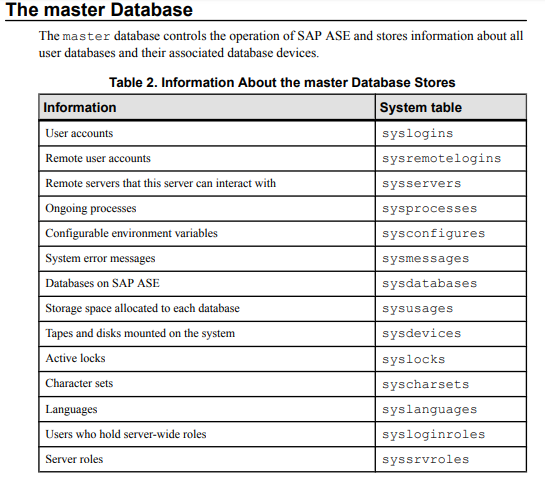
  • The master database contains system tables that keep track of information about  SAP ASE.In addition, each database (including the master database) contains system tables that keep track of information that is specific to that database. 
  • All the SAP ASE-supplied tables in the master database (the SAP ASE controlling database) are considered system tables. Each user database is created with a subset of these system tables. The system tables may also be called the data dictionary or the system catalogs. 
  • A master database and its tables are automatically created when SAP ASE is installed. The system tables in a user database are created when the create database command is issued. The names of all system tables start with “sys”. You cannot create tables in user databases that have the same names as system tables. See Reference Manual: Tables for detailed descriptions of system tables and their columns. 
Stored procedures or System procedures:

SAP ASE supplies stored procedures (called system procedures), many of which provide shortcuts for querying the system tables.

These system procedures provide information from the system tables:


Updating the system tables:Under ordinary circumstances, you need not perform direct data modifications to system tables.
Update system tables only when you are instructed to do so bySAP TechnicalSupport, by an instruction in the Error Messaging and Troubleshooting Guide, or asrequired by some system administration tasks.

Before you update system tables, you must issue a sp_configure command that enables system table updates

  • Modify system tables only inside a transaction. Issue a begin transaction command before you issue the data modification command. 
  • Verify that only the rows you wanted to be changed have been affected by the command and that the data has been changed correctly.
  •  If the command was incorrect, issue a rollback transaction command. If the command was correct, issue a commit transaction command. 

  •  the parameter value for a system procedure must enclose it in single or double quotes.
  • System procedures can be invoked during a session using either chained or unchained transaction mode. Chained mode implicitly begins a transaction before any data retrieval or modification statement. Unchained mode requires explicit begin transaction statements paired with commit transaction or rollback transaction statements to complete the transaction.
  • You cannot execute the system procedures that modify data in system tables in the master database from within a transaction.
  • If no transaction is active when you execute a system procedure, SAP ASE turns off chained mode and sets transaction isolation level 1 for the duration of the procedure.
Note:
All system procedures report a return status. For example, the following means that the procedure executed successfully: 
                                                   return status = 0
 If the system procedures do not execute successfully, the return status is a number other than 0. 

  •  xp_cmdshell, which executes an operating system command on the system that is running SAP ASE.


Wednesday, October 3, 2018

introduction to sybase DBA


  • Even though the process of SYBASE DBA has common work tasks for all types of applications running on top of Sybase. but SYBASE DBA need to have an overview about the applications to boost up the performance and other application specific activities.

  • Roles Required for System Administration Tasks: To perform system administration for SAP ASE the follow 4 roles are required. which are the integration of security, administration and operational tasks are grouped into the following roles:
  1.  sa_role
  2. sso_role
  3. sybase_ts_role
  4. oper_role   


Note: oper_role  is responsible for all types of backup(dump database, dump transaction, load database, load transaction) activities.

  • In addition, two users are classified based on their objects in Sybase DB:
  1. database owner.
  2. database object owner.
1.Database owner: The database owner is the creator of a database.

 A system administrator can use the grant command to grant users the authority to create databases.

A database owner can run:   


  •  sp_adduser to allow other SAP ASE users access to the database.
  • Use the grant command to give other users permission to create objects and execute commands within the database.
Note:

The database owner does not automatically receive permissions on objects owned by other users. However, a database owner can temporarily assume the permissions of other users in the database at any time by using the setuser command. Using a combination of the setuser and grant commands, the database owner can acquire permissions on any object in the database.

2.Database object owner: A database object owner is a user who creates a database object.

Database objects include tables, indexes, views, defaults, triggers, rules, constraints, and procedures. Before a user can create a database object, the database owner must grant the user permission to create objects of a particular type.

There is no special login name or password for a database object owner.
The database object owner creates an object using the appropriate create statement, and then grants permission to other users.

s use the setuser command to impersonate any other user in the database, including the object owner.

Note: need to create a database user by using security guide of sybase.


how to check DB version using isql in sybase DB

hostname /sybase/PL6% isql -U sapsa -Ppassword -Spl6 -X CT-LIBRARY error:         ct_connect(): directory service layer: internal directo...